




AtomVision Features: How It Works With Your Cameras

The AI Edge Analytic Box connects to existing ONVIF or RTSP cameras and runs Video AI on-site. An optional cloud dashboard is available for remote viewing and multi-site operations.

How It Connects

  • Camera Compatibility: Works with most IP cameras from Hikvision, Dahua, Axis, Hanwha, and others via ONVIF. Some older or proprietary models need a compatibility check.
  • Local inference: Analytics run on the edge box NPU. Cloud bandwidth is only needed if you enable remote viewing or sync.
  • Browser Access: Optional dashboard viewing from a web browser when cloud sync is enabled.
  • Catalog appliances: Standard and Professional connect over Gigabit Ethernet. Cellular is not built into these boxes.

Hardware Options

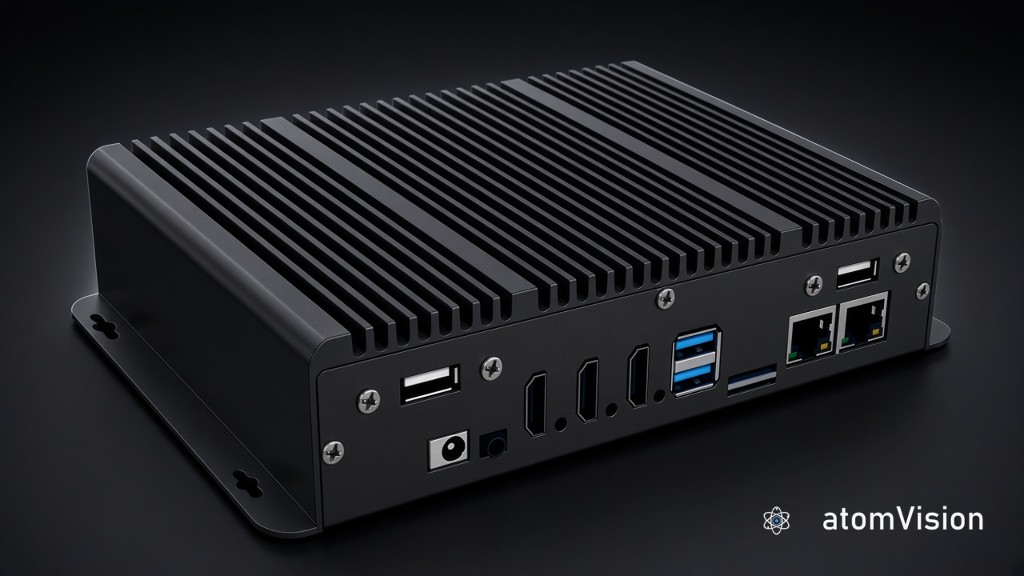
  • Edge Box Standard: RK3568, up to 4 AI streams, pilot and small sites
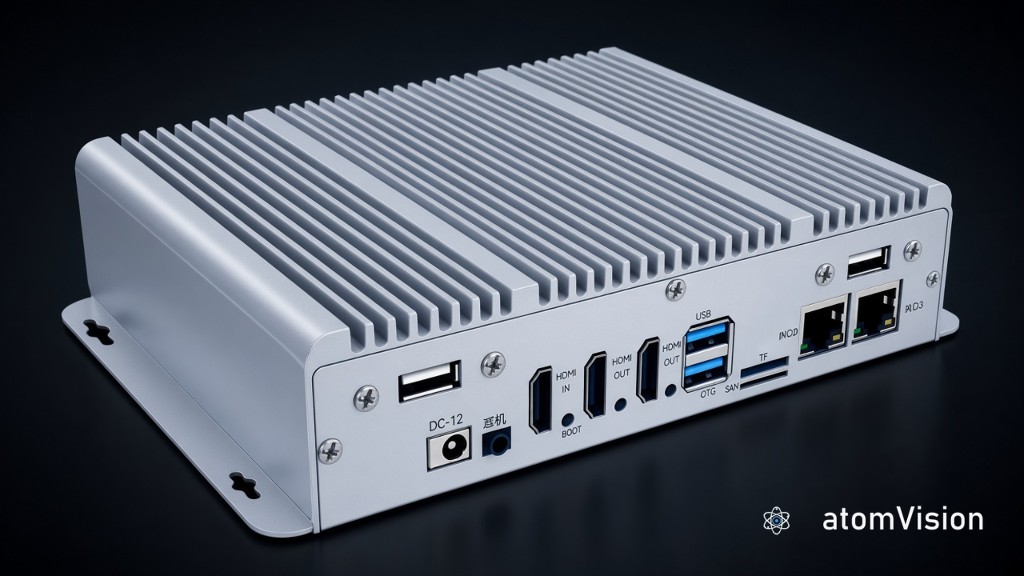
  • Edge Box Professional: RK3588, up to 16 AI streams, malls and job sites
  • Edge Box Enterprise: on-premise deployment on customized hardware

Security

  • Video is encrypted in transit and at rest
  • SOC 2 Type II reports available on request
  • SSO available (Okta, Azure AD)

Not sure if your cameras will work? Send us your model numbers and we'll check.

Edge AI + Cloud Dashboard

Video AI at the edge.
Ops in the cloud when you need it.

The AI Edge Analytic Box runs safety, counting, traffic, and access-control models locally. Optional AtomVision cloud for live walls, search, and multi-site management — same cameras, no rip-and-replace.

4K
Max Resolution
H.265
HEVC Codec
<200ms
Live Latency
ONVIF
Universal Support
TLS 1.3
Encryption
SSO
SAML available

Watch From Anywhere

Log in from a laptop, phone, or tablet. The dashboard runs in the browser — no desktop client to install.

Technical Specs

  • WebRTC with STUN/TURN NAT traversal
  • TLS 1.3 encrypted connections
  • Adaptive bitrate streaming (ABR)
  • Sub-200ms latency live view
atomvision.app · Investigations
Live · WebRTC P2P
Store 04Front entrance
Person · 0.94
LIVE · 14:02:18
Store 04 · CAM-12
14:02:18·1× speed
May 3 · 13:30 — 14:30
LoiterPersonPlate match
14:02
AtomVision
3 sites · 312 cameras
WH02 · Bay
Motion · Warehouse 2
Person in bay · 14:02:18
View
Acknowledge
iOS · Android
  • Browser-Based Viewing

    Access your live feeds through any modern web browser. Our HTML5 player uses standard media extensions for low-latency playback without needing custom plugins or legacy software.

  • Mobile browser

    Open the same dashboard on a phone or tablet. Push notifications depend on the browser and whether cloud sync is enabled.

  • Timeline Scrubbing

    Review footage quickly with an intuitive playback timeline. Export high-quality MP4 clips with synchronized timestamps for evidence or operational review.

  • Simplified Networking

    The AI Edge Analytic Box ingests cameras on your LAN and optionally syncs to cloud — no port forwarding required for local analytics.

The Little Box That Makes It Work

This is the hardware that connects your cameras to the cloud. Plug it into your network, scan a QR code, and you're done. It handles all the technical stuff so you don't have to.

Technical Specs

  • Standard: Rockchip RK3568 + ~1 TOPS NPU
  • Professional: Rockchip RK3588 + 6 TOPS NPU
  • Up to 4 streams (Standard) or 16 (Professional)
  • Enterprise: on-prem, hardware specified per site
atomvision.io · Setup · AI Edge Analytic Box Professional
Online · LAN 192.168.1.0/24
AI Edge Analytic Box Professional · AV-PRF-7F4A
SN 24-PRF-7F4A92 · MAC E4:5F:01:7F:4A:92 · fw 3.18.4
LAN
Online
NPU
6 TOPS
SoC
RK3588
ONVIF + mDNS scan192.168.1.0/245 of 254 · 78%
DeviceProfileStatus
  • HikvisionDS-2CD2143G2-IS
    192.168.1.42
    SG
    Connected
  • AxisP3245-LV
    192.168.1.51
    ST
    Connected
  • DahuaIPC-HDW3849H
    192.168.1.63
    S
    Connected
  • HanwhaWisenet XNV-8081Z
    192.168.1.78
    SG
    Pairing
  • UniviewIPC2122LR3
    192.168.1.84
    S
    Auth
5 cameras found · 3 paired · 2 awaiting Outbound MQTT 8883 · TLS 1.3
  • Universal Camera Support

    ONVIF Profile S/G/T compatible. Supports Axis, Hikvision, Dahua, Hanwha, Uniview, Vivotek, and most other major brands via RTSP/ONVIF discovery

  • Plug-and-Play Setup

    Automatic camera discovery via ONVIF and mDNS. QR code provisioning links to cloud account — most setups take under 15 minutes

  • On-device NPU

    RKNN inference on the catalog boxes. Standard is sized for lightweight detection. Professional runs multi-model safety, counting, and LPR.

  • Local event buffer

    Catalog boxes keep events on eMMC, with microSD expansion. Professional can add NVMe. Enterprise storage is scoped with the deployment.

All Your Locations, One Screen

If you've got cameras at multiple buildings—shops, warehouses, offices—you can see them all from one dashboard. No more logging into separate systems for each site.

Technical Specs

  • Unlimited sites per account
  • RBAC with custom roles
  • SSO via SAML 2.0 / OIDC
  • Full audit logging (90 days)
atomvision.app · Operations dashboard
47 sites · 312 cameras
Sites online
46/47
+1 today
Cameras
312
3 offline
Alerts · 24h
18
-7 vs avg
Avg uptime
99.7%
30-day
SiteRegionCamerasAlertsUptime
  • Store 04 · Bellevue
    West24/24299.9%
  • Store 11 · Portland
    West17/18599.4%
  • Warehouse 2 · Tacoma
    West64/64199.9%
  • DC East · Newark
    East95/96499.7%
  • Yard 7 · Atlanta
    Southeast30/32698.9%
  • Hierarchical Site Structure

    Organize cameras into regions, buildings, and zones. Supports unlimited nesting levels with inherited permissions

  • Unified Dashboard

    View sites on one screen with a multi-camera grid. Real-time health monitoring and status alerts.

  • Centralized Alert Routing

    Route alerts by site, camera, or event type. Integrate with PagerDuty, Slack, Microsoft Teams, and custom webhooks

  • Role-Based Access Control

    Define custom roles with granular permissions (view, playback, export, PTZ control). Integrate with Okta, Azure AD, and OneLogin via SAML 2.0

Won't Crush Your Internet

Streaming multiple cameras can eat bandwidth fast. Our system compresses video before uploading, records only when there's motion, and adjusts quality based on your connection.

Technical Specs

  • H.265 (HEVC) transcoding
  • Motion-based I-frame insertion
  • Per-camera bandwidth limits
  • QoS traffic shaping
atomvision.app · Bandwidth & QoS
Live · 7.3 Mbps up · cap 25 Mbps
Upload · last 60 min
7.3 Mbps
peak 11.4 · cap 25
H.265 · ABR · QoS on
13:0013:1513:3013:4514:00
Per-camera bitrate cap
drag to adjust
  • Store 04 · Front
    Continuous
    2.4 / 4 Mbps
  • Warehouse 2 · Bay
    Motion
    1.1 / 4 Mbps
  • Yard 7 · Gate
    Continuous
    3.2 / 5 Mbps
  • Lobby · Reception
    Schedule
    0.6 / 2 Mbps
H.264 → H.265−56% bandwidth
If H.264
16.6 Mbps
Actual · H.265
7.3 Mbps
  • Adaptive Bitrate Streaming

    HLS/DASH streaming with automatic quality switching based on viewer bandwidth. Supports 240p to 4K renditions

  • Upload Throttling

    Set per-camera and per-site upload limits (100Kbps to unlimited). Schedule high-quality uploads for off-peak hours

  • Edge Transcoding

    Hardware H.265 encoding on the edge box reduces cloud bandwidth 40-70% vs H.264 when remote viewing is enabled

  • Smart Recording Modes

    Continuous (24/7), motion-triggered, scheduled, or event-based recording. Motion sensitivity and detection zones configurable per camera

Security controls IT can review

Video is encrypted in transit and at rest. SSO is available. SOC 2 Type II reports and hardware documentation can be shared on request. Connected cameras follow their own manufacturer compliance.

Technical Specs

  • AES-256-GCM encryption
  • SOC 2 Type II reports on request
  • Hardware docs on request
  • TLS 1.3 transport security
atomvision.app · Settings · Security
AES-256-GCM · TLS 1.3
Audit log
Last 90 days · 12,418 events
SOC 2 Type II · Tamper-evident · Streamed to your SIEM
Identity
Ok
Okta · acme.okta.com
Connected
Protocol
SAML 2.0
JIT provisioning
SCIM v2
Group → Role mapping
  • atomvision-adminsAdmin
  • security-opsOperator
  • store-managersViewer
MFA enforced — all roles
154 / 154 users
  • End-to-End Encryption

    Video is encrypted using AES-256-GCM before it ever leaves your site. We use TLS 1.3 for all data in transit, ensuring your footage remains private from the camera to your screen.

  • Compliance documentation

    SOC 2 Type II reports, DPAs, and NDAA documentation for the edge appliance are available for procurement review. Connected cameras follow their own manufacturer compliance.

  • Enterprise Auth

    Secure your account with multi-factor authentication or integrate directly with Okta and Azure AD via SAML 2.0. Maintain a clear trail with detailed user audit logs.

  • Global Privacy

    Built with GDPR and HIPAA requirements in mind. Manage data residency by choosing specific storage regions and set automated retention policies that match your legal needs.

Plays Nice With Your Existing Systems

Already have a VMS, access control, or alarm system? We integrate with the tools you're already using. No need to rip and replace everything.

Technical Specs

  • REST API with webhooks
  • RTSP stream re-publishing
  • VMS integration (Milestone, Genetec)
  • Alarm panel triggers
atomvision.app · Integrations
REST · Webhooks · RTSP republish
POST request → Slack14:02:18 · 184 ms
Endpoint
POST https://hooks.slack.com/services/T0•••/B0•••/•••
Body · application/json
{
  "event": "motion.person",
  "site":  "Warehouse 2",
  "camera":"WH02-CAM-3",
  "ts":    "2026-05-03T14:02:18Z",
  "clip":  "https://atomvision.app/c/4f2a..."
}
Response200 OK
{ "ok": true, "channel": "#security-alerts" }
Connected systems
6 active
  • S
    Slack
    Webhook · #security-alerts
    active
  • MT
    Microsoft Teams
    Webhook · Ops · Security
    active
  • P
    PagerDuty
    Webhook · Critical events
    active
  • B
    Brivo
    OAuth 2.0 · Door ↔ camera link
    active
  • M
    Milestone
    RTSP push · XProtect 2024 R2
    active
  • G
    Genetec
    RTSP push · Security Center 5.12
    paused
+ Add Zapier, n8n, custom webhook…
  • VMS Integration

    Push camera streams to Milestone XProtect, Genetec Security Center, Nx Witness, or any VMS that accepts RTSP. Use us as a remote access layer on top of your existing setup.

  • Alert Webhooks

    Send alerts to Slack, Microsoft Teams, PagerDuty, or custom endpoints. Trigger workflows in Zapier, n8n, or your internal systems when events occur.

  • Access Control Links

    Integrate with Brivo, Openpath, Verkada, and other access control systems. Link door events to camera footage for unified incident review.

  • REST API

    Full programmatic access to cameras, recordings, and events. Build custom dashboards, embed live views in your internal tools, or automate clip exports.

The hardware

Two appliances. One on-prem option.

Standard and Professional are catalog boxes. Enterprise is the same software on hardware you specify with us.

AI Edge Analytic Box

Standard

Up to 4 AI streams · pilots, single-zone sites

AI Edge Analytic Box Standard, black chassis
  • RK3568 · ~1 TOPS NPU
  • eMMC + microSD
  • Dual GbE · HDMI · 12V
Most popular
AI Edge Analytic Box

Professional

Up to 16 AI streams · malls, job sites

AI Edge Analytic Box Professional, white chassis
  • RK3588 · 6 TOPS NPU
  • eMMC, microSD, NVMe option
  • Dual GbE · HDMI in/out
AI Edge Analytic Box

Enterprise

On-premise · hardware specified per site

On-premise deployment on customer-specified hardware. We do not publish a chassis for this tier.

  • Custom hardware · local inference
  • Scoped with the deployment
  • No catalog appliance
Compatibility

Supported Camera Brands

Works with most major IP camera manufacturers via ONVIF and native protocol support. See how our AI analytics work with your existing cameras.

atomvision.app · Compatibility checker
ONVIF · RTSP · vendor APIs
DS-2CD2143G2-ISEnter ↵
Type your camera model — we'll tell you what'll work.
HIK
Hikvision DS-2CD2143G2-IS
4 MP · IR fixed dome · ONVIF + ISAPI
Profile SProfile GProfile T Compatible
Live + playback over WebRTC
Edge motion + analytics metadata
Enable ONVIF in camera admin first
HIK
Hikvision
5,400+ models
AXI
Axis
1,200+ models
DAH
Dahua
3,800+ models
HAN
Hanwha
900+ models
UNI
Uniview
1,500+ models
VIV
Vivotek
600+ models
BOS
Bosch
350+ models
REO
Reolink
120+ models

Don't see your camera? If it speaks ONVIF Profile S or RTSP, it almost certainly works.

Honest Comparison

Cloud vs DVR/NVR: Which is Right for You?

We think cloud is better for most use cases—but not all. Here's an honest look at where each approach shines.

AtomVision Cloud
Multi-site, remote-first teams
Traditional DVR / NVR
Single-site, IT-managed
Remote access
Browser + mobile from anywhere
VPN or port forwarding required
Off-site backup
Survives theft / fire / flood
Recorder is the single point
Software updates
Pushed automatically
Manual firmware upgrades
Multi-site view
All locations · one screen
Log into each NVR separately
Up-front cost
Hardware + monthly subscription
One-time purchase
Internet need
Needs ~2 Mbps up per camera
Records without internet

Honest take: if you only have one location and rarely need remote access, a traditional NVR can still be fine. If you're tired of "I can't see the cameras from home" — go cloud.

Platform Walkthrough

See how the dashboard, AI search, and mobile app work together

See AtomVision in Action

Instead of a generic video, we'd rather show you how AtomVision handles your specific site requirements.

Multi-site dashboard walkthroughAI search demonstrationMobile app overview

Technical FAQ

Common questions about protocols, codecs, and integration

Will this work with my old Hikvision cameras?

Almost certainly yes. We support Hikvision, Dahua, Axis, Hanwha, Uniview, and most other major brands through ONVIF and RTSP. One thing to check: ONVIF is often disabled by default on Hikvision cameras—enable it in the camera's admin panel and you're good to go.

How much internet bandwidth do I actually need?

Analytics inference runs on the AI Edge Analytic Box locally — cloud bandwidth is only needed if you enable remote viewing or cloud sync. A 1080p substream for dashboard viewing typically uses 2–4 Mbps per camera when synced.

What's the difference between ONVIF Profile S, G, and T?

Profile S is live streaming—what most cameras support and what we primarily use. Profile G adds recording and playback from the camera's SD card; Profile T adds analytics metadata and PTZ. The edge box auto-discovers supported profiles.

Is your hardware NDAA compliant?

We can share component documentation for procurement review. We do not publish an NDAA badge on this page. Connected cameras, including some Hikvision and Dahua models, follow their own manufacturer compliance.

Can this integrate with my existing VMS?

We can push RTSP streams to Milestone XProtect, Genetec Security Center, Nx Witness, and other VMS platforms. We also have a REST API for custom integrations with access control systems and building management tools.

What happens when the internet goes down?

The edge box keeps events locally and still fires safety and counting alerts without internet. Catalog appliances buffer on eMMC or optional NVMe. Cloud sync resumes when the link is back. Enterprise storage is part of the on-prem design.

Why not just use my camera's built-in cloud feature?

Manufacturer clouds work fine for a handful of cameras at one location. They break down when you have 20+ cameras across multiple sites, need centralized user management, or want AI analytics beyond basic motion alerts. AtomVision is built for the multi-site, multi-brand use case.

What's your uptime like?

Our infrastructure runs on AWS with multi-region redundancy, and uptime has been consistently high. That said, camera availability depends more on your local network than our cloud—which is why we include health monitoring that alerts you when cameras go offline.

Want to see it with your own cameras?

We'll walk you through the setup and show you what it looks like in practice. No pressure—just a conversation about what you need.

See how businesses like yours use it: Read customer stories